Thanks for reporting this to us. It's patched in Scissors now, so here's a deeper look at how it works and what we changed.
Quick correction: the slot is just called
body. It's the slot horses and wolves wear their armor in. And it doesn't have to be an ingot or a sword. Any item works, because the whole trick is in the components.
How it works
Any item can have an
equippable component that says which slot it goes in, and this one says
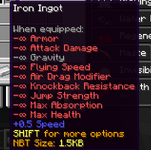
body. Players have a body slot too. Vanilla lets you right click an item into it, but there's no inventory slot for it, so once it's in there you can't take it back out. An item in that slot still applies its attribute modifiers to you, and this ingot sets nine of them to negative infinity. On top of that, it asks for a camera overlay that doesn't exist, so the missing texture covers your whole screen.
The item
It's a stack of 64 iron ingots with two components:
minecraft:equippable and
minecraft:attribute_modifiers.
Equippable
| Field | Value | What it does |
|---|
| slot | body | Puts it in a slot you can't see or empty. |
| camera_overlay | minecraft:n | There's no texture called n, so you get the purple and black missing texture over your whole screen. The client draws overlays from every equipment slot, not just your helmet. |
| allowed_entities | not set | Anything can wear it, players included. |
| swappable | default (true) | Right-click with it to equip it. |
Attribute modifiers
There are ten modifiers, all
add_value and all on the
body slot. Minecraft clamps every attribute to its allowed range, so negative infinity just drops the attribute to its minimum.
| Attribute | Amount | Result |
|---|
| movement_speed | +0.5 | 0.6 instead of 0.1, six times normal walking speed |
| armor | -∞ | 0 |
| attack_damage | -∞ | 0, your hits do nothing |
| gravity | -∞ | -1, its minimum |
| flying_speed | -∞ | 0 |
| air_drag_modifier | -∞ | 0, nothing slows you down in the air |
| knockback_resistance | -∞ | -2, you take extra knockback |
| jump_strength | -∞ | 0, you can't jump |
| max_absorption | -∞ | 0 |
| max_health | -∞ | 1, half a heart |
Honestly the movement speed is the worst part. You basically walk forever, and nothing you do fixes it. Same with the air drag modifier, this makes you fly super fast. Both combined make controlling movement harder than Getting Over It.
Why it's so hard to get rid of
Right clicking moves one ingot from the stack into your body slot. Logging out doesn't help because the body slot saves with your player data and it's right back when you join. Dying gets rid of the missing texture, but the attributes stay, and you keep walking forever after you respawn. Even
/attribute can't fix it.
This led us to a separate vanilla bug we found and fixed. If a modifier gets swapped for one with the same ID but a different operation, the old one gets stuck in there for good, and not even
/attribute can remove it. That's why the command couldn't remove the attributes that were applied from the item.
Who's affected
This is vanilla behavior. The bug exists in stock Paper as well (and while they could patch it, we know they won't). Obviously, we've patched it in the latest Scissors build but you can also use an NBT cucker to fix it as well.
What Scissors does now
Items can't hold NaN or infinite attribute amounts anymore. That applies however the item gets made, whether it's from commands, plugins, creative mode, saved worlds and player data, or tucked inside a bundle, shulker box or crossbow. The only camera overlay we allow is the vanilla pumpkin one, and only on your head. Any other overlay gets removed, including ones from custom resource packs.
Players can't use the body or saddle slots anymore, whether that's by right-clicking, commands or plugins. Animals still use them like normal. Attributes also refuse infinite and NaN values no matter where they come from, and the stuck-modifier bug is fixed. If someone in creative sends one of these items, the server cleans it and sends the clean version back so their copy matches.
If you already got hit
You don't need to do anything. Next time you join, Scissors pulls the item out of the hidden slot, removes its effects, cleans it up, and puts it in your inventory. If your inventory's full, it holds onto the item and gives it back once you have room (thank Codex for catching every single edge case).