

- 424
- IGN
- videogamesm12
Introduction
The locked chest crash was an exploit that took advantage of a bug in how the game rendered block textures to crash anyone who happened to get stuck inside a block with a missing texture. All block types in the game extend off a single object as a template. Mojang made two serious mistakes: the game never registers a proper texture to use for the Locked Chest block (which was added as an April Fools joke with Beta 1.4) and the failsafe for missing textures wasn't a complete fix as they missed a spot. Because of these two mistakes, the client can crash with a NullPointerException if the player is stuck inside a locked chest. The bug causing the exploit was introduced in snapshots for version 1.5, which changed how textures are loaded in the client from a single PNG file to having PNG files for each block (which is how it works to this day), but was never utilized on the server as far as I'm aware. It was mitigated by Mojang with the release of 1.7.2 by removing locked chests, but the underlying issue remained unfixed until the release of 1.8, which rewrote how the game handled block and item textures and introduced new safety nets.The exploit was discovered jointly by SupItsDillon and mrnintendoguy1 in mid-2013 whilst bug hunting on the server. As far as records go, this exploit doesn't seem to have been intentionally used on the server. Most staff at the time were still very dismissive of the exploit, with people assuming that it was caused by using WorldEdit on tile entities like chests. Research into Minecraft exploits wasn't anywhere near as advanced as far as it has now, so the exploit became obsolete and forgotten about for years after being fixed. I wasn't even aware of it until very recently after finding a thread talking about it in admin-only sections of the ProBoards forums. To ensure that it doesn't become forgotten again, I have decided to revisit this exploit and give it the attention that modern exploits get today.
This technical explanation was written with the codebase of version 1.6.4 in mind. Code provided was partially deobfuscated by the Legacy Fabric team and further deobfuscated for the purposes of this thread by myself.
Background Information
The Locked Chest was added in Beta 1.4 by Notch as part of an April Fools joke in 2011. They were naturally and randomly generated across the world. Right clicking them would open a menu that would tell the user they needed to buy a "Steve Co. Supply Crate Key" from the Minecraft Store to unlock it, an obvious reference to Team Fortress 2's Mann Co.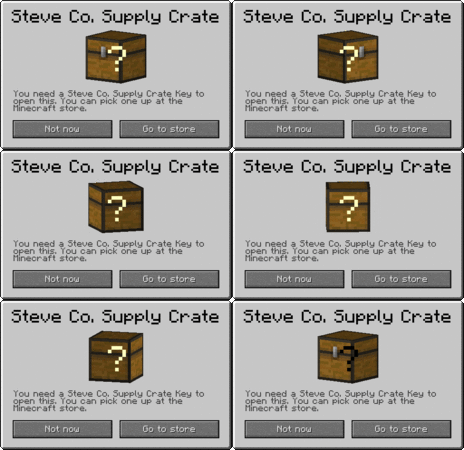
Clicking the "Go to store" option would present the user with a seemingly legit looking store page with options for the supply crate keys (with the 5 pack costing more than individual keys) along with some pretty hilarious options for other stuff you could buy, like enlargement pills going for $2, a name change for $99, a response from support for $494, and a "Secret Griefer Identity" for only $155. Absolute bargins, if I do say so myself.

The page isn't as funny anymore due to archive rot, but here's a video of someone going through the process and buying some keys back in April 2011:
The locked chest was later removed after April 1st in Beta 1.4_01 which effectively removed all functionality for it but kept it in the game to avoid crashes. Instead, the block would gradually and randomly disappear from the worlds. It sat around in this state for a while, but later it was stripped of its texture in the 1.3.1 update entirely, probably so that the placeholder texture would distinguish it from actual chests and avoid confusion on why chests were disappearing from their worlds. Even after the 1.5 update which revamped how textures are managed and handled, the block persisted until it was later removed entirely in the 1.7.2 update.
How exactly did it work?
Every block type in Minecraft uses a single class as a template that they extend off of for their own uses. When they do this, they can inherit and/or override code from their predecessor. Block types by default have a field called "side" which stores the texture used for the sides of the block when rendering it. They are set using a function calledregisterTextures, which is called right before the game loads assets like block and item textures. Whenever the game wants to get a block type's side texture, it calls one of three functions called getTexture, getSideTexture, and getViewTexture.
Java:
protected String getTextureName() {
    return this.textureName == null ? "MISSING_ICON_TILE_" + this.id + "_" + this.translationKey : this.textureName;
}

public void registerTextures(TextureRegistry registry) {
    this.side = registry.registerTexture(this.getTextureName());
}
Java:
public Texture getViewTexture(BlockView blockView, int x, int y, int z, int i) {
    return this.getTexture(i, blockView.getBlockData(x, y, z));
}

public Texture getTexture(int side, int blockData) {
    return this.side;
}

public final Texture getSideTexture(int side) {
    return this.getTexture(side, 0);
}
This is pretty normal behavior, and even if the texture being registered doesn't actually exist in the games files, it safely falls back onto an automatically generated "missing texture" texture, but it won't be happy about it. Some blocks actually override
registerTextures to give blocks a "top" texture. Here's what the locked chest does with its version of the function instead:
Java:
@Override
public void registerTextures(TextureRegistry registry) {
}
Bruh. Since it doesn't call the "super" function (which just tells the game to call the object's predecessor's function), the game effectively does nothing when it goes to register a texture for the locked chest, which means that the variable is set to null, representing nothing. Now, you'd expect this to outright crash the game if it tried to even render the block texture, but as you can clearly see here the game is running just fine. What's going on here?
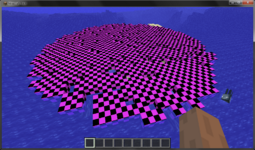
Well, the game actually has a failsafe in its block renderer for this exact situation where it checks to see if the texture it has is null and if so, reverts back to the missing texture as a fallback. This is used in pretty much everything surrounding the 3D block renderer, and was introduced in a 1.5 snapshot after Mojang received multiple bug reports about locked chests crashing their game.
Java:
public Texture getViewTextureSafely(Block block, BlockView blockView, int i, int j, int k, int l) {
    return this.getTextureSafely(block.getViewTexture(blockView, i, j, k, l));
}

public Texture getTextureSafely(Block block, int i, int j) {
    return this.getTextureSafely(block.getTexture(i, j));
}

public Texture getSideTextureSafely(Block block, int i) {
    return this.getTextureSafely(block.getSideTexture(i));
}

public Texture getSideTextureSafely(Block block) {
    return this.getTextureSafely(block.getSideTexture(1));
}

public Texture getTextureSafely(Texture texture) {
    if (texture == null) {
        texture = ((SpriteAtlasTexture)MinecraftClient.getInstance().getTextureManager().getTexture(SpriteAtlasTexture.BLOCK_ATLAS_TEX)).getSprite("missingno");
    }

    return texture;
}
However, they actually missed a spot in their code, and it affects code that is called when the player gets stuck in a block. Near the end of the game rendering code is a function that renders overlays onto your screen for stuff like water or (in our case) a block texture. Within this function is a block of code that checks to see if you're stuck in a block and if you are, it calls code to render the block's texture over your screen. Notice how it doesn't have any safety nets and instead directly calls the block type's
getSideTexture function, which in the locked chest's case just returns null:
Java:
if (this.client.player.isInsideWall()) {
    int roundedX = MathHelper.floor(this.client.player.x);
    int roundedY = MathHelper.floor(this.client.player.y);
    int roundedZ = MathHelper.floor(this.client.player.z);
    int blockId = this.client.world.getBlock(roundedX, roundedY, roundedZ);
    if (this.client.world.isBlockSolid(roundedX, roundedY, roundedZ)) {
        this.renderBlockTextureOverlay(tickDelta, Block.BLOCKS[blockId].getSideTexture(2));
    } else {
        // no block found, try again but with some offsets
        for (int offset = 0; offset < 8; offset++) {
            float xOffset = ((offset >> 0) % 2 - 0.5F) * this.client.player.width * 0.9F;
            float yOffset = ((offset >> 1) % 2 - 0.5F) * this.client.player.height * 0.2F;
            float zOffset = ((offset >> 2) % 2 - 0.5F) * this.client.player.width * 0.9F;
            int roundedOffsetX = MathHelper.floor(roundedX + xOffset);
            int roundedOffsetY = MathHelper.floor(roundedY + yOffset);
            int roundedOffsetZ = MathHelper.floor(roundedZ + zOffset);
            if (this.client.world.isBlockSolid(roundedOffsetX, roundedOffsetY, roundedOffsetZ)) {
                blockId = this.client.world.getBlock(roundedOffsetX, roundedOffsetY, roundedOffsetZ);
            }
        }
    }

    if (Block.BLOCKS[blockId] != null) {
        this.renderBlockTextureOverlay(tickDelta, Block.BLOCKS[blockId].getSideTexture(2));
    }
}
Moving onto the
renderBlockTextureOverlay function. Here's the code broken up with comments provided by myself which should help you read the code better:
Java:
private void renderBlockTextureOverlay(float f, Texture texture) {
    // Load in the block textures from memory
    this.client.getTextureManager().bindTexture(SpriteAtlasTexture.BLOCK_ATLAS_TEX);
    Tessellator tess = Tessellator.INSTANCE;

    // Darken texture color
    float color = 0.1F;
    GL11.glColor4f(color, color, color, 0.5F);
    GL11.glPushMatrix();

    float var5 = -1.0F;
    float var6 = 1.0F;
    float var7 = -1.0F;
    float var8 = 1.0F;
    float var9 = -0.5F;

    // Get offset from memory
    float minU = texture.getMinU(); // totally won't crash the game
    float maxU = texture.getMaxU();
    float minV = texture.getMinV();
    float maxV = texture.getMaxV();

    // Draw the texture
    tess.begin();
    tess.vertex(var5, var7, var9, maxU, maxV);
    tess.vertex(var6, var7, var9, minU, maxV);
    tess.vertex(var6, var8, var9, minU, minV);
    tess.vertex(var5, var8, var9, maxU, minV);
    tess.end();

    // Ok, we're done. Set future texture colors back to full brightness.
    GL11.glPopMatrix();
    GL11.glColor4f(1.0F, 1.0F, 1.0F, 1.0F);
}
It first sets up some preliminary variables and graphics calls. Once that's done, it now needs to fetch the position of the texture from memory, so it gets the non-existent texture's X positi-
Oh, shit. Java intervenes and throws up an error because the game just tried to get something that doesn't exist to do something, resulting in a game crash. This is also pretty much what happens in 1.5 snapshots prior to 13w03a for block rendering as well.
What do you mean it was "mitigated"?
While removing locked chests technically fixed the immediate issue and made the exploit impossible to pull off in a vanilla environment, the faulty code lacking a safety net was still present in the game's code as late as 1.7.10. This means that if a mod didn't register textures for the blocks it added like it's supposed to, it could have still happened in a modded environment with custom modded blocks if you were unlucky enough.How can I protect myself against this exploit?
It really does depend on your environment, if you're a mod developer, and your willingness to update Minecraft.If you're using Eaglercraft
You don't need to do anything. I tested the exploit against Eaglercraft 1.5.2 and it seems to be completely immune to the effects of this exploit. Thank you Eagler devs, very cool!
If you're a mod developer
NOTE: This section was written under the impression that your development environment is a Legacy Fabric environment. If not, you will likely have to adapt your changes based on your own development environment and its capabilities.To fix only the locked chest causing the problems and not the root cause of the problem, you can simply add a bit of code like below to a mixin to modify its client-side behavior to call the method it inherited from the regular block code. This comes with the caveat that it WILL spew an error into the logs about a missing texture file on startup.
Java:
package your.packaqe.here.mixin;

import net.minecraft.block.Block;
import net.minecraft.block.LockedChestBlock;
import net.minecraft.block.material.Material;
import net.minecraft.client.TextureRegistry;
import org.spongepowered.asm.mixin.Mixin;

@Mixin(LockedChestBlock.class)
public abstract class LockedChestBlockMixin extends Block
{
    protected LockedChestBlockMixin(int i, Material material)
    {
        super(i, material);
    }

    @Override
    public void registerTextures(TextureRegistry registry)
    {
        super.registerTextures(registry);
    }
}
If you want to fix the root problem altogether since it's a flaw that Mojang would have likely fixed if they knew about it, you can instead opt to use this bit of code which injects a little bit of code into the block overlay rendering function to set the texture argument to the missing texture sprite if it detects that said argument is null. This will fix the problem entirely and would have likely been Mojang's solution back then.
Java:
package your.packaqe.here.mixin;

import net.minecraft.client.MinecraftClient;
import net.minecraft.client.Texture;
import net.minecraft.client.render.item.HeldItemRenderer;
import net.minecraft.client.texture.SpriteAtlasTexture;
import org.spongepowered.asm.mixin.Mixin;
import org.spongepowered.asm.mixin.Shadow;
import org.spongepowered.asm.mixin.injection.At;
import org.spongepowered.asm.mixin.injection.ModifyVariable;

@Mixin(HeldItemRenderer.class)
public class HeldItemRendererMixin
{
    @Shadow private MinecraftClient client;

    @ModifyVariable(method = "method_5135", at = @At("HEAD"), argsOnly = true)
    public Texture fixCrash(Texture tex)
    {
        if (tex == null)
        {
            return ((SpriteAtlasTexture) client.getTextureManager().getTexture(SpriteAtlasTexture.BLOCK_ATLAS_TEX)).getSprite("missingno");
        }

        return tex;
    }
}
If you're willing to update your game
The solution is to simply update your instance to at least 1.8.9. That version effectively modernized the game and fixed a lot of issues with the game that earlier versions simply didn't. If you prefer the classic feel of 1.7.10 and earlier, then simply go with 1.7.x but keep in mind that the buggy code still wouldn't be fixed.How did we handle this exploit back then?
It's kind of hard to tell, and I wasn't around for this one because I first joined on October 30, 2013 and by that point the server had just updated to 1.7.2. Prior to that, the exploit was dismissed as just another crash exploit and yet another reason for tile entities like chests and furnaces to be blocked altogether, despite the fact it had nothing to do with those:Varuct said:Surprise, worldediting TickingEntities will cause a TickingEntity crash ~_~
wild1145 said:I think we blocked chests from being worldedited on CJFreedom anyway (Or i need to, don't remember what) as they look to be a pointless thing to WE, but im sure someone will be able to give me a really bright pointless use to them, as usual ~_~
As with many exploits of the time, the workaround that seemed to work back then according to the report was to just wipe affected the player data of anyone who was affected. This would work because then the player wouldn't be stuck in the area with the locked chests anymore, but that wouldn't stop it from happening again and again. The issue was naturally resolved when the server updated to version 1.7.2, so the exploit became largely irrelevant and obscure as it no longer worked.
Conclusion
Thank you again for reading this. I had a bit of fun trying to dig through old code and establish when, where, and why this exploit happens. This is probably the first exploit I've researched for threads like this that I didn't encounter myself, and I enjoyed learning more about a historical exploit that came and went during an extremely primitive time where they were hardly researched, especially on places like TotalFreedom. Later, I might do research into some other historical exploits from around the same time period, so if you know of any from back then you should absolutely let me know.
Last edited:


