

- 420
- IGN
- videogamesm12
The year was 2015, and Windows was in a pretty rough shape. Their last operating system, Windows 8, had garnered a reputation amongst critics, power users, and even regular users due to its drastic UX changes that focused heavily on catering to touchscreen devices rather than the desktop/laptops that most people were familiar with. This reputation seriously dented the reputation of the Windows operating system in the eyes of many. Some people were considering migrating from Windows to other ecosystems like Mac OS or Linux. Others even stuck with Windows 7, its precursor, because of its reliability and entirely desktop-focused user experience.
To try and win back the Windows userbase and yet still unify their phone, tablet, and desktop ecosystems, Microsoft began development of a new iteration of the operating system called Windows 10 just a year earlier. To give the public a look into what Microsoft was cooking and to gather feedback, they also introduced the Windows Insider testing program which allowed regular consumers to install prerelease development builds of the operating system, report bugs, and give feedback about the operating system.
There was considerable hype for the operating system. Insiders and testers were praising its various improvements over Windows 8 and the new features it was bringing to the table. One TotalFreedom user was even quoted by the marketing for Windows 10, saying it combined the strengths of Windows 8 and Windows 7.
Furthermore, to encourage people to upgrade when it comes out, they are promising to make upgrades for this new operating system completely free and in-place for anyone using Windows 7 or Windows 8, meaning you didn't have to pay a dime to get a lot of these improvements and new features. If you didn't like it for any reason, you could simply revert back to what you had before, and it didn't cost you a penny.
On July 29, 2015, they officially released the operating system to the public. Those who reserved the free upgrade would be automatically upgraded to it once their system was ready. Those who were more impatient could simply run the installer themselves and upgrade that way. Adoption amongst the public came far quicker than Windows 8 ever did - within just 5 months it dethroned Windows 8 as the second most used version of Windows and by January 2018 it managed to dethrone the position as the most version of Windows previously held by the Windows 7 juggernaut. Granted, this was thanks to an incredibly aggressive push by Microsoft to get people to move to it, but still.
Despite its initial praise, Windows 10's reputation has soured over the years due to changes made to the operating system and the foundation it laid for pain points of Windows still felt by users today, such as its forced updates, aggressive push for Microsoft accounts, poor user interface consistency, anti-user practices, invasive spyware-like behavior, advertising tactics, and even increasingly poor performance. Many of these came from changes made in subsequent updates released months or even years after it originally came out.
It's been more than 10 years since I first installed Windows 10, and out of curiosity I wanted to experience Windows 10 as an early adopter again like I did back in August 2015. So, I installed it onto an old liberated Chromebook with hardware comparable to the laptop I had back then.
Gathering the hardware necessary was also fairly easy. I had a stockpile of old, end-of-life but still fully functional and jailbroken Chromebooks in my closet from my previous years of experimentation, so it really was a matter of just plucking one from the closet, making sure there wasn't anything important on it, and then just installing Windows onto it. My choice ended up being a Dell Chromebook 11 3120 which I previously used to help archive Imgur and some other dying web services just a few years prior. Here are its specifications:
It again asked for a product key, so I skipped it again. After that, it prompted me with a bunch of privacy settings (with most of the invasive ones turned on by default). After creating a local account and refusing to connect the system to my Wi-Fi network, I soon reached the desktop.
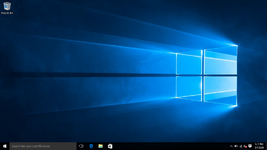
It immediately became clear that I needed to install some drivers as it was clearly using the built-in Microsoft display drivers and the trackpad still didn't work. Fortunately, I had a flash drive on hand from working with other systems that contained Snappy Driver Installer. Installing drivers went without a hitch as well, even if it took a really long time. It honestly didn't make that much of a different functionality-wise as the sound and trackpad still didn't work, at least having the Intel drivers meant that the system would perform better overall.
The second matter I had to attend to was getting a modern web browser installed. To Microsoft's credit, the version of Microsoft Edge that shipped with Windows 10 back then is actually alright. It's new enough to be better than Internet Explorer, but old enough to break most modern websites. In the case of my blog, it doesn't support the variable system that my stylesheet uses so while elements are centered and structurally correctly displayed, visually it doesn't apply any of the theming elements it has.
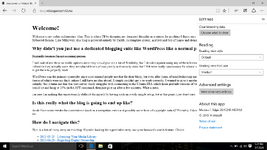
MY EYES
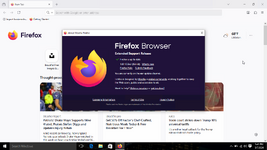
Firefox version 128 installed without a hitch. It automatically updated itself to use 140 ESR in subsequent restarts, which is probably the last major version of the browser to run on such an old version of Windows 10. Even still, it's more than perfectly capable of browsing the web today since it's far more up to date than Edge and Internet Explorer.
Now that Windows is mostly functional again, let's try to use it.
A lot of the issues I faced when it came to actual functionality were usually caused by either the Chromebook's limited hardware or the lack of available drivers, neither of which are exactly Windows' fault to begin with. For example, the creator of the UEFI firmware replacements for Chromebooks gatekeeps custom audio drivers for Windows operating systems behind a paywall, so it's not Windows' fault it doesn't have working built-in audio. In another example, there is also quite a serious bug where putting the system to sleep will cause the system to lock up completely the next time you try to wake it up, meaning you'll have to power it off and on again to get it back in working order.
Despite these limitations, in a vacuum I can say that Windows 10 version 1507 is... usable on this Chromebook. Performance wise, it's not the greatest, but I was able to play a basic game of Spider Solitaire while listening to some Undertale music on YouTube in the background without needing to run any operating system debloating/optimization scripts. Opening programs was very snappy and the operating system animations were very smooth.
Even recording Solitaire gameplay was a decent experience. I still have no idea how they managed to make Game DVR run so well on hardware of this era back then, but I used to use it all the time because it was the only screen recording utility in Windows which wouldn't lag my whole computer trying to record anything on my craptop of the time.
Actual gameplay footage recorded using the Chromebook.
Even the memory usage was okay - out of the 4 GB of RAM that this thing has, only 2.3 GB of it was actually being used when I had Notepad++ and Firefox open.
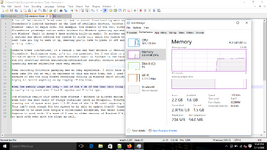
The struggle really only comes from storage - Windows is bloated enough even in version 1507 that even with the most basic of things installed (such as Notepad++, Firefox, and 7-Zip), I was already running out of space with just 1.3 GB free of the 16 GB total capacity of built-in eMMC storage. This isn't even enough for the system to be able to update itself! Granted, Chromebooks *were* intended to be used with Google's cloud-based ecosystem, but under Linux I still had a lot more legroom to work with. I'm sure if I ran an older version of Windows I'd probably have more legroom to work with even with the bloat as well.
Due to Windows 10's lengthy development lifecycle (starting from late 2014 all the way up to around mid-2021), there were a lot of changes done over the years. While in some places it has remained fundamentally the same, in other places it feels like a completely different operating system. Let me show you.
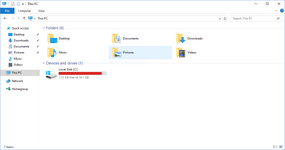
At the time of its launch in 2015 leading all the way up until around late 2017, Windows 10 used the Metro design language that Microsoft was still hardlining on, which encouraged the use of flat, simplistic vector icons, simple font and color choices, and minimalist geometric shapes for all UI elements. Many of the icons you see in Windows 10 even today (such as the Recycle Bin icon) are designed with Metro in mind.
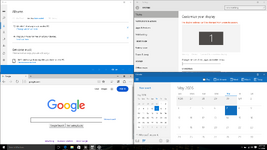
Oh, the memories.In late 2017, Microsoft released a new design language called Fluent, which focuses on translucency, animations, element depth, element material, and element scale. It seems to combine the strengths of the Aero design language (such as transparency and drop shadows) with that of the cleanliness of Metro. Over the course of the next few years, Microsoft transitioned most elements in Windows 10 which previously had Metro (like the Settings app) from Metro to Fluent.
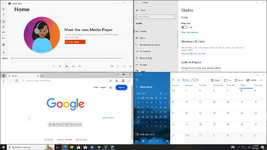
It just doesn't hit the same.
One could make the argument that this shift in design language reflects a shift in the direction Windows was going. Whether it was for the best or not, I couldn't tell you.
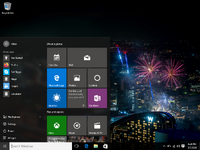
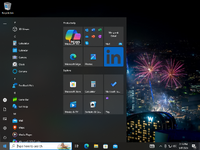
Side-by-side comparison of the two start menus.
Despite being so short-lived, the original design still occasionally appears in marketing materials for the both operating system itself and computers that would have come with it from time to time.
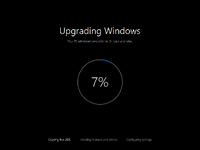
I remember sitting and excitedly watching this on my laptop back in the day.
This screen was later replaced with a generic "working on updates" like screen after the... Anniversary Update, I think? I didn't experience it when I was installing Windows this time around, but I did actually see it recently while trying to upgrade someone's computer incrementally. It was quite a blast from the past.
For example, the Calendar app actually works locally and does not require a Microsoft account or email account to function. I know that this continued to be the case even in version 22H2, but last year Microsoft actually replaced both the Calendar app and the Mail app (which were both lowkey useful) with a new version of Outlook. While on paper it might have made sense to unify these apps, in practice it's an objective downgrade for anyone who likes everything to be local *because you can't use the program at all (not even the calendar) without logging into Outlook with an email account*. You can't even revert back to the old Calendar app because it just closes itself and opens the shitty Outlook program instead. You *have* to either use their shitty Outlook app or use a third party alternative. You have no say in the matter.
This is probably the biggest indicator of how different Microsoft's direction was for Windows. In later versions of the operating system, Microsoft started *heavily* shifting their operating system's attitude and behavior to make it increasingly difficult and annoying to not use their services. Windows nowadays treats you like you're the asshole for not doing as they wish. You don't want to log in with your Microsoft account? Fine, we'll just aggressively shill apps and services that require a Microsoft account at any chance we get. You don't want to use our awesome new AI that totally isn't hot garbage? Kiss our corporate asses, we're gonna sneak it into your system anyways and *pin it to your taskbar* as part of a mandatory update. You *still* don't want a Microsoft account? How dare you. We're going to include a permanent hotlink to Microsoft Rewards in your computer's *settings* app which you also can't get rid of without using third party hacks. It'll serve as a constant reminder that you decided not to be a good little user and do what we want, because fuck you for having the freedom of choice. Asshole.
Let's not even mention the ads. Oh god, the ads. The taskbar in later versions of Windows is booby trapped to throw up a massive window full of ads whenever your mouse is near a specific spot in it. If you want to actually see the weather, instead of getting a nice small widget that pops up you get slamdunked with political garbage, sports information, and if you scroll enough you may get some games. Meanwhile, the weather is just this tiny widget inside the massive popup, and don't tell me you can just disable them in the options, because that only works if you're logged into your Microsoft account.
Okay, sure, version 1507 had ads too in the form of those live tiles that you'd see in the start menu, but you know what was awesome about those? If you didn't like them, you could get rid of them. How? By simply right clicking the tile and clicking either Unpin from Start or Uninstall. If you liked a tile, you could even resize it to take up more room in the start menu. Microsoft solved this problem, un-solved it, and then made it worse.
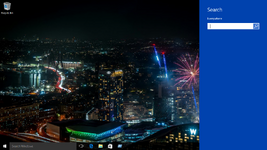
The search flyout from Windows 8 is still present in the operating system in this stage and can be accessed with the command
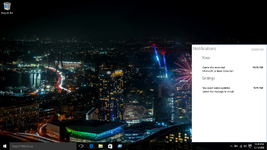
The early notification center from development builds of the operating system can be re-enabled by setting the registry key
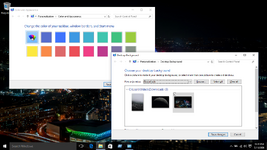
Windows 10 moved a bunch of the personalization options for the desktop wallpaper and accent color to the Settings app, but forgot to move the theme selection options from the Control Panel to the Settings app. Despite moving those options, it's still possible to access the old versions of the personalization menus through certain commands:
Despite replacing the entirety of the Windows start screen from Windows 8 with a proper start menu, there are enough leftover resources to make it possible to use a combination of file replacements and registry tweaks to bring it back in a partially working state. Some things (like localized strings, certain animations, and the ability to pin tiles) are completely broken, but other stuff apparently works. I never tried it because I like having a stable system, but it might be worth a shot for those who like to tinker.
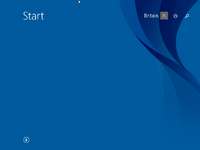
Image "borrowed" from BetaWiki.
The login screen also still has a huge chunk of leftover code from Windows 8. If you replace the `LogonUI.exe` file with a version from an earlier development build of the operating system, you can actually restore the older (and in my opinion much better) login screen from Windows 8, though apparently it has some bugs that when encountered will require you to restart your computer.
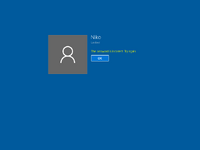
This is one of the few things from Windows 8 that I wish they kept around.
I still remember installing Windows 10 for the first time and seeing it as a massive improvement over Windows 8, primarily because it didn't have the start screen which made no sense to have on my craptop of the time, seeing as it didn't have a touchscreen. I also found the Game DVR feature genuinely useful because it meant I could record my screen and have decent quality without sacrificing system or even game performance. I saw Windows 10 as a window of hope for the future of Windows and I was incredibly optimistic that maybe, just maybe, we'll get something as great as Windows 7 again. However, with time, I became increasingly pessimistic as Microsoft just kept fucking up their operating system with every update.
Using Windows 10 in this state again brought back just a tiny sliver of that feeling again. It ran damn well despite the hardware I was throwing it at, and I suspect for basic tasks I would be able to do very basic tasks just fine if I just had more disk space. It certainly isn't the most well polished version of Windows 10, but it was also when Microsoft still had a direction of where they wanted things to go. It makes me wish there was a Windows 10 equivalent of the "Better than Adventure" modpack for Minecraft, except instead it's an operating system.
Thanks for reading. Eventually, I want to give Windows 8 a retrospective look and see if it was really as bad as people remember it and to experience it like how it was meant to be experienced: on a tablet. Whether I'll be able to get ahold of one though, only time will tell.
To try and win back the Windows userbase and yet still unify their phone, tablet, and desktop ecosystems, Microsoft began development of a new iteration of the operating system called Windows 10 just a year earlier. To give the public a look into what Microsoft was cooking and to gather feedback, they also introduced the Windows Insider testing program which allowed regular consumers to install prerelease development builds of the operating system, report bugs, and give feedback about the operating system.
There was considerable hype for the operating system. Insiders and testers were praising its various improvements over Windows 8 and the new features it was bringing to the table. One TotalFreedom user was even quoted by the marketing for Windows 10, saying it combined the strengths of Windows 8 and Windows 7.
Furthermore, to encourage people to upgrade when it comes out, they are promising to make upgrades for this new operating system completely free and in-place for anyone using Windows 7 or Windows 8, meaning you didn't have to pay a dime to get a lot of these improvements and new features. If you didn't like it for any reason, you could simply revert back to what you had before, and it didn't cost you a penny.
On July 29, 2015, they officially released the operating system to the public. Those who reserved the free upgrade would be automatically upgraded to it once their system was ready. Those who were more impatient could simply run the installer themselves and upgrade that way. Adoption amongst the public came far quicker than Windows 8 ever did - within just 5 months it dethroned Windows 8 as the second most used version of Windows and by January 2018 it managed to dethrone the position as the most version of Windows previously held by the Windows 7 juggernaut. Granted, this was thanks to an incredibly aggressive push by Microsoft to get people to move to it, but still.
Despite its initial praise, Windows 10's reputation has soured over the years due to changes made to the operating system and the foundation it laid for pain points of Windows still felt by users today, such as its forced updates, aggressive push for Microsoft accounts, poor user interface consistency, anti-user practices, invasive spyware-like behavior, advertising tactics, and even increasingly poor performance. Many of these came from changes made in subsequent updates released months or even years after it originally came out.
It's been more than 10 years since I first installed Windows 10, and out of curiosity I wanted to experience Windows 10 as an early adopter again like I did back in August 2015. So, I installed it onto an old liberated Chromebook with hardware comparable to the laptop I had back then.
Preparation
Since Windows 10 changed drastically in the years that followed its release, I had to download the installation media for version 1507 of the operating system, which was the RTM release that shipped out to millions of computers overnight on July 30, 2015. Fortunately, someone has since reuploaded the ISO images for this version of Windows for every language and architecture onto the Internet Archive.Gathering the hardware necessary was also fairly easy. I had a stockpile of old, end-of-life but still fully functional and jailbroken Chromebooks in my closet from my previous years of experimentation, so it really was a matter of just plucking one from the closet, making sure there wasn't anything important on it, and then just installing Windows onto it. My choice ended up being a Dell Chromebook 11 3120 which I previously used to help archive Imgur and some other dying web services just a few years prior. Here are its specifications:
- Intel Celeron N2840 @ 2.16 GHz
- 4 GB DDR3 RAM
- 16 GB eMMC Storage
Installing Windows 10 version 1507
The process of booting into the Windows 10 installation media and installing the operating system was surprisingly very smooth. Even though the trackpad didn't work at all, everything else did, and I was totally content with just using the keyboard controls for the entire setup. Since there was no product key tied to the computer, it asked me for a product key. I skipped it and chose to install Windows 10 Pro since I had the option. It took a while to install, which I can't tell if that's because of the eMMC storage, the weak CPU, or just 1507 being fairly slow, but it eventually got into the Windows out of box experience.It again asked for a product key, so I skipped it again. After that, it prompted me with a bunch of privacy settings (with most of the invasive ones turned on by default). After creating a local account and refusing to connect the system to my Wi-Fi network, I soon reached the desktop.
Post-installation setup
Even though the installation process had finished, there was still work that needed to be done.It immediately became clear that I needed to install some drivers as it was clearly using the built-in Microsoft display drivers and the trackpad still didn't work. Fortunately, I had a flash drive on hand from working with other systems that contained Snappy Driver Installer. Installing drivers went without a hitch as well, even if it took a really long time. It honestly didn't make that much of a different functionality-wise as the sound and trackpad still didn't work, at least having the Intel drivers meant that the system would perform better overall.
The second matter I had to attend to was getting a modern web browser installed. To Microsoft's credit, the version of Microsoft Edge that shipped with Windows 10 back then is actually alright. It's new enough to be better than Internet Explorer, but old enough to break most modern websites. In the case of my blog, it doesn't support the variable system that my stylesheet uses so while elements are centered and structurally correctly displayed, visually it doesn't apply any of the theming elements it has.
MY EYES
Firefox version 128 installed without a hitch. It automatically updated itself to use 140 ESR in subsequent restarts, which is probably the last major version of the browser to run on such an old version of Windows 10. Even still, it's more than perfectly capable of browsing the web today since it's far more up to date than Edge and Internet Explorer.
Now that Windows is mostly functional again, let's try to use it.
How well does it run on the Chromebook?
Given the hardware specifications that I have to work with, one has to wonder how well Windows 10 actually runs on such a system. The answer is... quite well, actually.A lot of the issues I faced when it came to actual functionality were usually caused by either the Chromebook's limited hardware or the lack of available drivers, neither of which are exactly Windows' fault to begin with. For example, the creator of the UEFI firmware replacements for Chromebooks gatekeeps custom audio drivers for Windows operating systems behind a paywall, so it's not Windows' fault it doesn't have working built-in audio. In another example, there is also quite a serious bug where putting the system to sleep will cause the system to lock up completely the next time you try to wake it up, meaning you'll have to power it off and on again to get it back in working order.
Despite these limitations, in a vacuum I can say that Windows 10 version 1507 is... usable on this Chromebook. Performance wise, it's not the greatest, but I was able to play a basic game of Spider Solitaire while listening to some Undertale music on YouTube in the background without needing to run any operating system debloating/optimization scripts. Opening programs was very snappy and the operating system animations were very smooth.
Even recording Solitaire gameplay was a decent experience. I still have no idea how they managed to make Game DVR run so well on hardware of this era back then, but I used to use it all the time because it was the only screen recording utility in Windows which wouldn't lag my whole computer trying to record anything on my craptop of the time.
Even the memory usage was okay - out of the 4 GB of RAM that this thing has, only 2.3 GB of it was actually being used when I had Notepad++ and Firefox open.
The state of Windows 10 back then
Windows 10 marked a shift in development strategy for Microsoft. Instead of the traditional iterative development process where a specific version is treated like its own individual product with large amounts of changes in between releases (like how Windows 7 and Windows 8 were), Windows 10 instead adopted the "software as a service" policy where Windows as a product was the same, but the operating system itself would change over time through the use of feature updates.Due to Windows 10's lengthy development lifecycle (starting from late 2014 all the way up to around mid-2021), there were a lot of changes done over the years. While in some places it has remained fundamentally the same, in other places it feels like a completely different operating system. Let me show you.
Differences in design language
During its lifespan, Windows 10's design language shifted considerably over the years.At the time of its launch in 2015 leading all the way up until around late 2017, Windows 10 used the Metro design language that Microsoft was still hardlining on, which encouraged the use of flat, simplistic vector icons, simple font and color choices, and minimalist geometric shapes for all UI elements. Many of the icons you see in Windows 10 even today (such as the Recycle Bin icon) are designed with Metro in mind.
Oh, the memories.
It just doesn't hit the same.
One could make the argument that this shift in design language reflects a shift in the direction Windows was going. Whether it was for the best or not, I couldn't tell you.
The short-lived original start menu design
Windows 10's start menu was quite different in version 1507. It used a unique two-column design where the left column held a traditional list of programs and shell links and right column held all of your tiles. In practice, it was flawed, but I feel like it has a unique charm to it. A year after the release of Windows 10, version 1607 (also known as the Anniversary Update) came out, which completely replaced the start menu's design with the three-column design that has been in the operating system since then.Side-by-side comparison of the two start menus.
Despite being so short-lived, the original design still occasionally appears in marketing materials for the both operating system itself and computers that would have come with it from time to time.
The short-lived original upgrade screen
Windows 10 also originally had a rather obscure screen that would show when you were upgrading versions. This screen would show you how far you were into the upgrade process, what your system was doing, and what needed to be done. Early adopters of Windows 10 will definitely remember this screen.I remember sitting and excitedly watching this on my laptop back in the day.
This screen was later replaced with a generic "working on updates" like screen after the... Anniversary Update, I think? I didn't experience it when I was installing Windows this time around, but I did actually see it recently while trying to upgrade someone's computer incrementally. It was quite a blast from the past.
Less nagging, more respect for the user
Windows 10 used to be a lot more respectful toward your wishes to have things done the way you wanted them to. It would still occasionally politely you ask you to create a Microsoft account, but it wouldn't stop you from not doing so and most applications you are presented with will still function without one.For example, the Calendar app actually works locally and does not require a Microsoft account or email account to function. I know that this continued to be the case even in version 22H2, but last year Microsoft actually replaced both the Calendar app and the Mail app (which were both lowkey useful) with a new version of Outlook. While on paper it might have made sense to unify these apps, in practice it's an objective downgrade for anyone who likes everything to be local *because you can't use the program at all (not even the calendar) without logging into Outlook with an email account*. You can't even revert back to the old Calendar app because it just closes itself and opens the shitty Outlook program instead. You *have* to either use their shitty Outlook app or use a third party alternative. You have no say in the matter.
This is probably the biggest indicator of how different Microsoft's direction was for Windows. In later versions of the operating system, Microsoft started *heavily* shifting their operating system's attitude and behavior to make it increasingly difficult and annoying to not use their services. Windows nowadays treats you like you're the asshole for not doing as they wish. You don't want to log in with your Microsoft account? Fine, we'll just aggressively shill apps and services that require a Microsoft account at any chance we get. You don't want to use our awesome new AI that totally isn't hot garbage? Kiss our corporate asses, we're gonna sneak it into your system anyways and *pin it to your taskbar* as part of a mandatory update. You *still* don't want a Microsoft account? How dare you. We're going to include a permanent hotlink to Microsoft Rewards in your computer's *settings* app which you also can't get rid of without using third party hacks. It'll serve as a constant reminder that you decided not to be a good little user and do what we want, because fuck you for having the freedom of choice. Asshole.
Let's not even mention the ads. Oh god, the ads. The taskbar in later versions of Windows is booby trapped to throw up a massive window full of ads whenever your mouse is near a specific spot in it. If you want to actually see the weather, instead of getting a nice small widget that pops up you get slamdunked with political garbage, sports information, and if you scroll enough you may get some games. Meanwhile, the weather is just this tiny widget inside the massive popup, and don't tell me you can just disable them in the options, because that only works if you're logged into your Microsoft account.
Okay, sure, version 1507 had ads too in the form of those live tiles that you'd see in the start menu, but you know what was awesome about those? If you didn't like them, you could get rid of them. How? By simply right clicking the tile and clicking either Unpin from Start or Uninstall. If you liked a tile, you could even resize it to take up more room in the start menu. Microsoft solved this problem, un-solved it, and then made it worse.
Leftovers
It's clear that the original release was rushed to meet the July 29, 2015 deadline as it's riddled with leftovers from Windows 8 and Windows 10's early development builds. The "beta operating system" community has pretty extensively datamined this particular version of Windows and found a bunch of interesting stuff. Most of these were later removed in later builds of the operating system. I'll include some of the more fascinating ones.The search flyout from Windows 8 is still present in the operating system in this stage and can be accessed with the command
rundll32 -sta {C90FB8CA-3295-4462-A721-2935E83694BA}.The early notification center from development builds of the operating system can be re-enabled by setting the registry key
HKEY_LOCAL_MACHINE\Software\Microsoft\Windows\CurrentVersion\ImmersiveShell\UseActionCenterExperience to 0.Windows 10 moved a bunch of the personalization options for the desktop wallpaper and accent color to the Settings app, but forgot to move the theme selection options from the Control Panel to the Settings app. Despite moving those options, it's still possible to access the old versions of the personalization menus through certain commands:
- The desktop wallpaper menu can be accessed using the command
explorer.exe shell:::{ED834ED6-4B5A-4bfe-8F11-A626DCB6A921} -Microsoft.Personalization\pageWallpaper. - The accent color menu can be accessed by using one of these commands, and it's actually recommended to go this route because this version of Windows doesn't actually let you use a custom accent color in the Settings app:
control colorshell:::{ED834ED6-4B5A-4bfe-8F11-A626DCB6A921} -Microsoft.Personalization\pageColorization
Despite replacing the entirety of the Windows start screen from Windows 8 with a proper start menu, there are enough leftover resources to make it possible to use a combination of file replacements and registry tweaks to bring it back in a partially working state. Some things (like localized strings, certain animations, and the ability to pin tiles) are completely broken, but other stuff apparently works. I never tried it because I like having a stable system, but it might be worth a shot for those who like to tinker.
Image "borrowed" from BetaWiki.
The login screen also still has a huge chunk of leftover code from Windows 8. If you replace the `LogonUI.exe` file with a version from an earlier development build of the operating system, you can actually restore the older (and in my opinion much better) login screen from Windows 8, though apparently it has some bugs that when encountered will require you to restart your computer.
This is one of the few things from Windows 8 that I wish they kept around.
Conclusion
Using the original version of Windows 10 again for the first time in quite possible years brought back a lot of memories from a much simpler time in tech when things looked a lot more hopeful and the tech industry wasn't trying to fuck you in the ass at any chance they could get to make an extra buck. I can only wonder what Windows would have been like if Microsoft kept the simplistic Metro UI scheme for the entirety of lifecycle and actually fully implemented it everywhere. Would it have looked good? Maybe the modding scene can answer that one.I still remember installing Windows 10 for the first time and seeing it as a massive improvement over Windows 8, primarily because it didn't have the start screen which made no sense to have on my craptop of the time, seeing as it didn't have a touchscreen. I also found the Game DVR feature genuinely useful because it meant I could record my screen and have decent quality without sacrificing system or even game performance. I saw Windows 10 as a window of hope for the future of Windows and I was incredibly optimistic that maybe, just maybe, we'll get something as great as Windows 7 again. However, with time, I became increasingly pessimistic as Microsoft just kept fucking up their operating system with every update.
Using Windows 10 in this state again brought back just a tiny sliver of that feeling again. It ran damn well despite the hardware I was throwing it at, and I suspect for basic tasks I would be able to do very basic tasks just fine if I just had more disk space. It certainly isn't the most well polished version of Windows 10, but it was also when Microsoft still had a direction of where they wanted things to go. It makes me wish there was a Windows 10 equivalent of the "Better than Adventure" modpack for Minecraft, except instead it's an operating system.
Thanks for reading. Eventually, I want to give Windows 8 a retrospective look and see if it was really as bad as people remember it and to experience it like how it was meant to be experienced: on a tablet. Whether I'll be able to get ahold of one though, only time will tell.


