- 423
- IGN
- videogamesm12
The year is 2009, and Microsoft has just released the next successor to the Windows operating system, intended to right most of the wrongs that its predecessor had and yet simultaneously further polish the operating system. This new operating system was called Windows 7, and it was a massive hit even before it even came out - sales for pre-orders were reaching new records on storefronts like Amazon and within 2 years of launch it dethroned Windows XP as the dominant version in terms of marketshare. Not out of necessity, mind you, because XP remained officially supported for an extra 3 years, but because 7 was a genuine improvement that was worth the hype.
While computer hardware has advanced considerably, Windows has stagnated. Nearly 17 years later, consumers still have yet to get anything close to Windows 7. Windows 8 was a massive disappointment, Windows 10 was okay, and Windows 11 is still absolute garbage. This thread will explain why I believe 7 is still the king of Windows versions despite being almost 20 years old.
However, Windows 7 is like a breath of fresh air. There is no bloat to remove, no telemetry to disable, and no tweaks to make. You literally install it, go through the out of box experience, reach the desktop, maybe install some drivers and updates, and then optionally personalize your system with its rich set of wallpapers and color choices. You don't need to jump through a bunch of hoops to fix Windows 11's objectively awful start menu, you don't need to run a debloating script or generate a custom ISO to remove Copilot and Candy Crush, and you absolutely don't have to worry about needing a Microsoft account or bypassing such a requirement. It just works. Even the average consumer can get up and running without any of the Microsoft nonsense that modern Windows shoves down your throat.
If you think I'm lying, I challenge you to either get an older Windows 7 capable PC or even a virtual machine and install a consumer grade version of Windows using a stock ISO. Go through the steps I briefly outlined before and try telling me that the experience isn't a genuinely friendlier and more productive experience. You simply can't.

Screencap from a "Frutiger Aero" music radio livestream.
Modern Windows attempts to capture this sort of nostalgia by inconsistently introducing "transparent" effects in various bits and pieces of the operating system. However, in my opinion its execution and implementation is far worse than older versions of Windows like Windows 7 and Vista. To understand what I mean, let's take a look at how Windows 7 does transparent effects and incorporates it into something that is both user accessible and beautiful.
Under Windows 7, the effect is consistently implemented everywhere. Even programs that don't necessarily take advantage of it still have the effect in their title bar and borders around them, creating a resulting in a very consistently well executed user experience. Furthermore, most programs use the non-transparent parts to effectively convey your options. The start menu for example uses the Aero effect to very clearly define a secondary column for useful links in a list like your user folder, your documents folder, the Control Panel, the "computer" page in the explorer, and if all else fails it gives you an option to get help. When you start typing to search, it immediately gets rid of the second column and fills the entire thing with the search results instead of closing the start menu and opening up some entirely separate dedicated search UI, which just looks hastily prepared and half-baked. Finally, I want to mention the fact that this entire effect is layered. The effect doesn't just happen with your desktop but also other programs which are layered under them. Want to give everything a slight tint or make it so vibrant it almost looks like neon? Go for it. It's clear so much polish and care was put into this, and it looks gorgeous.
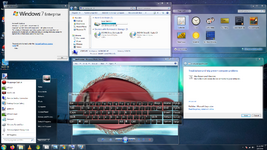
You're as beautiful as the day I lost you
Literally any color you could dream of.
Now, let's look at how later versions of Windows do this. Windows 8 completely removed Aero and most forms of transparency at the very last minute because the hardware market they were desperately trying to appeal to (and ultimately flopped face-first in) apparently couldn't handle it. In Windows 10, the only transparency you get is some frosted glass look in the taskbar, start menu, and Settings app, but that's all you get and there is no real way to influence the colors chosen or the intensity beyond setting the accent color to something that Microsoft allows you to do, and even then this effect doesn't even show up anywhere beyond that, which is quite disappointing to be honest. Windows 7 let you set your accent color to literally whatever you want and you could even tweak how much of your color gets mixed in with the glassy elements. However, unlike Windows 7 the transparency effect only works on one window at a time. At least the layering feature is technically still there since you can see the windows under them, even if it's hard to notice.
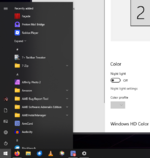
Bleugh
Windows 11's transparency is a joke and it isn't even true transparency, merely an illusion that they falsely market as "transparency". It uses the Mica design language, which I'll admit doesn't look terrible on the surface, but it really falls apart when you take into account having other windows or having any form of consistency. You see, instead of taking into the windows under the one being rendered into account, Microsoft for whatever reason decided that it should only account for "theme settings" (I have no idea what this means and I've found that the accent color makes no difference) and the currently set desktop background. So, if you have a transparent window being rendered on top of another one, it's like the windows under it simply don't exist. That's not transparency, that's tunnel vision. However, the piece of shit start dashboard and taskbar seem to be exempt from this rule as I found it did account for windows you have under them, so it's just a confusing mess.
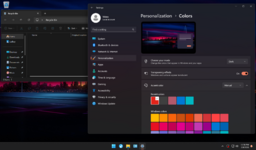
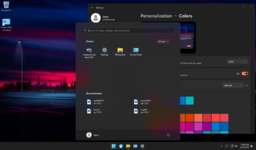
There are two different types of Mica - Mica and Mica Alt. I'll let Microsoft's official documentation explain what the difference is.
Windows 11 uses both and it does so incredibly inconsistently. Unlike Windows 7 where Aero was under a single umbrella and every program would at least show some form of Aero glass somewhere, 11 is a mishmash of the different ideas. The piece of shit start dashboard and Settings app use Mica, but the File Explorer uses Mica Alt. Win32 applications are just... complicated. You might get Mica in your title bars, but other components (particularly legacy applications and the window for Minecraft: Java Edition) seem to revert to your accent color, so I have absolutely no idea what the hell is going on at this point.
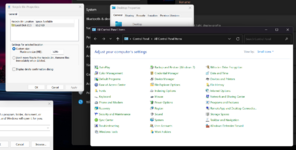
Let me remind you that Windows 7 solved this issue cromulently enough. Because the DWM covered every base and window it could, even legacy programs show Windows Aero in some way even if it was just the window borders. It wasn't this confusing, inconsistent mess where it only selectively applies in certain places. Why Microsoft didn't just make everyone happy by backporting the Aero glass effect from Windows 7 is completely beyond me, but this is the unfortunate state of Windows.
Windows 7 on the other hand wasn't like this. Almost everything was available in the Control Panel and there wasn't a separate app for certain options. While some things like screensavers still used the old, XP-era personalization windows, you still accessed it from the Control Panel. This meant no matter what you were looking for, you were guaranteed to find it in the location you are expecting. Desktop wallpaper and accent color? Control Panel. Updates? Control Panel. Network settings? Control Panel.
How about mechanical hard drives? For years Windows 10 and Windows 11 have been plagued with the issue of running like absolute dog water if it's installed and running off of a mechanical hard drive. Any time you check Task Manager, for whatever reason the disk usage is guaranteed to be locked at 100%, and everything slows to a crawl. This is usually resolved by replacing the drive with an SSD, but with the way memory prices have been going lately that's going to be quite difficult. On the other hand, Windows 7 runs great on a hard drive. My current media center PC which runs Windows 7 has the laptop sized hard drive that it came with still installed and running, and it runs like a dream.
However, the benefits don't just affect people with weaker hardware - they benefit the people with much beefier hardware too. Windows 7 was the first version to officially and properly support running on solid state storage, and boy howdy does it run! My desktop computer from 2012 with the aforementioned 3rd/4th generation i5 and 16 GB of RAM was pretty fast before, but after I installed a Samsung SATA SSD that thing was firing on all cylinders and to this day it's still the best computer I've ever used. It's extremely responsive, but the most impressive metric was how the SSD affected boot times. It only takes 7-8 seconds to get from the "Starting Windows" screen to the desktop. Holy shit.
Crashes were always a rarity when running the operating system on hardware it was designed for, anyways. I only saw my older systems bluescreen maybe once or twice in their entire lifetime and this would always clear up after a simple restart. On more modern versions of Windows, it was not uncommon for the entire Windows shell to crash or experience some weird bugs. Crashes are also an eventuality you have to face at least once or twice, especially if your system bricks itself trying to sneak an update while you're asleep. You also certainly don't see the Control Panel causing the file explorer to violently misbehave in different ways and show how everything is basically bolted onto the original legacy shell like you can so obviously see with Windows 11.
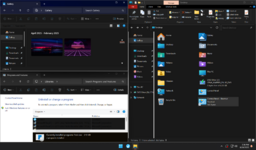
I literally just clicked around and it did this.
However, none of this should surprise you as it's a well-known fact that Microsoft does absolutely jack squat for QA testing in post-Windows 8 versions. Bugs like this are expected and accepted, unlike in Windows 7 where pretty much every nook and cranny was accounted for.
I know I sound really salty with this, but that's because I have become grossly embittered with every new Windows release starting with Windows 8. Every time I use a modern version of Windows, it's like as if Windows itself tries to fight me every step of the way. Even under Windows 10 Enterprise LTSC 2021, Edge finds a way to install itself and then prevent you from uninstalling it. Literally the behavior that malware used to do. You can't uninstall invasive components like Recall from your system, but you can merely disable them in the Settings app. Yeah, I bet that won't "accidentally" get reset in the future thanks to an update. I'm going to include a classic video which pretty much sums up the modern Windows experience perfectly. Content warning and all that.
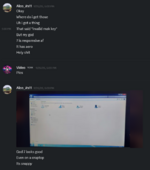
I AM FUCKING RENDERING SOMETHING YOU COCKSUCKER
When I go back to Windows 7 or even use Linux, I feel like I'm the one in control for once. I can install and uninstall any program I'd like, and even disable Internet Explorer. I don't have to play hopscotch with my system and work around some arbitrary restriction Microsoft puts into place. I just go to the setting, set it to what I want, and boom. Done.
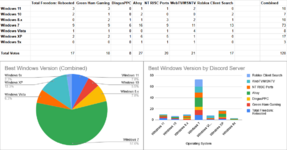
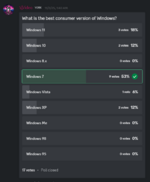
I am running a poll in several communities I'm part of asking what the best consumer grade version of Windows was. In 2 weeks from now, I will update this to show the results. I ran a poll in our Discord server a few months back asking what the best version of Windows was and 7 was the dominant option - 53% of 17 voters voted for it. Whether I'll get similar results in other communities is yet to be seen.
While computer hardware has advanced considerably, Windows has stagnated. Nearly 17 years later, consumers still have yet to get anything close to Windows 7. Windows 8 was a massive disappointment, Windows 10 was okay, and Windows 11 is still absolute garbage. This thread will explain why I believe 7 is still the king of Windows versions despite being almost 20 years old.
Ergonomic, bloat-free, and user-friendly out of the box
To make modern versions of Windows at least somewhat usable, you have to install additional software to fix issues with the UI (such as StartAllBack) and either use a special enterprise-grade version of the operating system that doesn't have the bloat or generate an ISO yourself with the garbage manually excluded. This time-consuming tradition started with the release of Windows 8 and has plagued subsequent versions of Windows even now.However, Windows 7 is like a breath of fresh air. There is no bloat to remove, no telemetry to disable, and no tweaks to make. You literally install it, go through the out of box experience, reach the desktop, maybe install some drivers and updates, and then optionally personalize your system with its rich set of wallpapers and color choices. You don't need to jump through a bunch of hoops to fix Windows 11's objectively awful start menu, you don't need to run a debloating script or generate a custom ISO to remove Copilot and Candy Crush, and you absolutely don't have to worry about needing a Microsoft account or bypassing such a requirement. It just works. Even the average consumer can get up and running without any of the Microsoft nonsense that modern Windows shoves down your throat.
If you think I'm lying, I challenge you to either get an older Windows 7 capable PC or even a virtual machine and install a consumer grade version of Windows using a stock ISO. Go through the steps I briefly outlined before and try telling me that the experience isn't a genuinely friendlier and more productive experience. You simply can't.
Beautiful, well-executed design language which has aged like wine
In recent years, my generation (especially the more technically inclined) has become nostalgic for the user interfaces and design language that was prevalent in the 2000s and early 2010s. In a similar vein to Vaporwave, this led to the birth of an aesthetic called Frutiger Aero, depicting grassy fields with blue skies and glossy elements. Many depictions take elements from Windows 7 to complete the look and feel they're going for. For many people, they do it for the aesthetic and a sense of nostalgia.Screencap from a "Frutiger Aero" music radio livestream.
Under Windows 7, the effect is consistently implemented everywhere. Even programs that don't necessarily take advantage of it still have the effect in their title bar and borders around them, creating a resulting in a very consistently well executed user experience. Furthermore, most programs use the non-transparent parts to effectively convey your options. The start menu for example uses the Aero effect to very clearly define a secondary column for useful links in a list like your user folder, your documents folder, the Control Panel, the "computer" page in the explorer, and if all else fails it gives you an option to get help. When you start typing to search, it immediately gets rid of the second column and fills the entire thing with the search results instead of closing the start menu and opening up some entirely separate dedicated search UI, which just looks hastily prepared and half-baked. Finally, I want to mention the fact that this entire effect is layered. The effect doesn't just happen with your desktop but also other programs which are layered under them. Want to give everything a slight tint or make it so vibrant it almost looks like neon? Go for it. It's clear so much polish and care was put into this, and it looks gorgeous.
You're as beautiful as the day I lost you
Now, let's look at how later versions of Windows do this. Windows 8 completely removed Aero and most forms of transparency at the very last minute because the hardware market they were desperately trying to appeal to (and ultimately flopped face-first in) apparently couldn't handle it. In Windows 10, the only transparency you get is some frosted glass look in the taskbar, start menu, and Settings app, but that's all you get and there is no real way to influence the colors chosen or the intensity beyond setting the accent color to something that Microsoft allows you to do, and even then this effect doesn't even show up anywhere beyond that, which is quite disappointing to be honest. Windows 7 let you set your accent color to literally whatever you want and you could even tweak how much of your color gets mixed in with the glassy elements. However, unlike Windows 7 the transparency effect only works on one window at a time. At least the layering feature is technically still there since you can see the windows under them, even if it's hard to notice.
Bleugh
There are two different types of Mica - Mica and Mica Alt. I'll let Microsoft's official documentation explain what the difference is.
Mica Alt is a variant of Mica, with stronger tinting of the user's desktop background color. You can apply Mica Alt to your app's backdrop to provide a deeper visual hierarchy than Mica, especially when creating an app with a tabbed title bar. Mica Alt is available for apps that use Windows App SDK 1.1 or later, while running on Windows 11 version 22000 or later.
Windows 11 uses both and it does so incredibly inconsistently. Unlike Windows 7 where Aero was under a single umbrella and every program would at least show some form of Aero glass somewhere, 11 is a mishmash of the different ideas. The piece of shit start dashboard and Settings app use Mica, but the File Explorer uses Mica Alt. Win32 applications are just... complicated. You might get Mica in your title bars, but other components (particularly legacy applications and the window for Minecraft: Java Edition) seem to revert to your accent color, so I have absolutely no idea what the hell is going on at this point.
Let me remind you that Windows 7 solved this issue cromulently enough. Because the DWM covered every base and window it could, even legacy programs show Windows Aero in some way even if it was just the window borders. It wasn't this confusing, inconsistent mess where it only selectively applies in certain places. Why Microsoft didn't just make everyone happy by backporting the Aero glass effect from Windows 7 is completely beyond me, but this is the unfortunate state of Windows.
Centralized settings location
Since the release of Windows 8, Microsoft has left Windows in this weird state where some options are only available in the legacy Control Panel, some options are only available in the new-and-downgraded Settings app, and some options are even duplicated in both. This is such a minor nitpick, but it's been an issue plaguing the operating system for years and it only seems to get worse as Microsoft drags their feet on deciding whether an option should be migrated to the Settings app or just left as-is, causing us to (as StevenNL2000 put it 5 years ago) get the worst of both worlds. As a result, most modern versions of Windows are confusing to navigate for particular settings because you have to either use the search feature or spend 20 minutes digging through the Settings app only to find that the option is present as a tiny, not-so-obvious hotlink away from where it would normally be.Windows 7 on the other hand wasn't like this. Almost everything was available in the Control Panel and there wasn't a separate app for certain options. While some things like screensavers still used the old, XP-era personalization windows, you still accessed it from the Control Panel. This meant no matter what you were looking for, you were guaranteed to find it in the location you are expecting. Desktop wallpaper and accent color? Control Panel. Updates? Control Panel. Network settings? Control Panel.
Blistering performance, even on weaker hardware
Windows 7 was built to run on computers from before 2009. As a result of the hardware of the time being rather weak, Windows was actually incredibly well-optimized and runs extremely snappy, even on the weaker side of hardware. Do you have a piece of shit Lenovo Ideapad 110-15IBR which struggles to run Windows 10 thanks to its piss poor Pentium processor and measly 4 GB of RAM? Try sticking Windows 7 onto it, and watch as it literally goes from struggling under its own weight to being extremely responsive and still managing to pull off Aero.How about mechanical hard drives? For years Windows 10 and Windows 11 have been plagued with the issue of running like absolute dog water if it's installed and running off of a mechanical hard drive. Any time you check Task Manager, for whatever reason the disk usage is guaranteed to be locked at 100%, and everything slows to a crawl. This is usually resolved by replacing the drive with an SSD, but with the way memory prices have been going lately that's going to be quite difficult. On the other hand, Windows 7 runs great on a hard drive. My current media center PC which runs Windows 7 has the laptop sized hard drive that it came with still installed and running, and it runs like a dream.
However, the benefits don't just affect people with weaker hardware - they benefit the people with much beefier hardware too. Windows 7 was the first version to officially and properly support running on solid state storage, and boy howdy does it run! My desktop computer from 2012 with the aforementioned 3rd/4th generation i5 and 16 GB of RAM was pretty fast before, but after I installed a Samsung SATA SSD that thing was firing on all cylinders and to this day it's still the best computer I've ever used. It's extremely responsive, but the most impressive metric was how the SSD affected boot times. It only takes 7-8 seconds to get from the "Starting Windows" screen to the desktop. Holy shit.
Rock solid stability
Beyond regular use, it was perfectly capable of holding its own and remaining on for weeks if not months straight without any issues. How do I know this? Because that's precisely what I did a few years ago with some of my old systems. Uptimes were measured in months and would only be reset due to power interruptions, system updates, or software installations. My old 3rd/4th generation i5 HP desktop lasted 4 months of uninterrupted uptime, which was only cut off after a power failure cut power to 95% of my room. My dual-core Celeron laptop from 2014? Literally an entire year, and then some. Nothing in Windows crashed despite running for such a long time and memory usage was consistent and stable.Crashes were always a rarity when running the operating system on hardware it was designed for, anyways. I only saw my older systems bluescreen maybe once or twice in their entire lifetime and this would always clear up after a simple restart. On more modern versions of Windows, it was not uncommon for the entire Windows shell to crash or experience some weird bugs. Crashes are also an eventuality you have to face at least once or twice, especially if your system bricks itself trying to sneak an update while you're asleep. You also certainly don't see the Control Panel causing the file explorer to violently misbehave in different ways and show how everything is basically bolted onto the original legacy shell like you can so obviously see with Windows 11.
I literally just clicked around and it did this.
However, none of this should surprise you as it's a well-known fact that Microsoft does absolutely jack squat for QA testing in post-Windows 8 versions. Bugs like this are expected and accepted, unlike in Windows 7 where pretty much every nook and cranny was accounted for.
You're in control of your system
Windows 7 is arguably the last version to truly give you control of your system. It didn't make your computer an advertising billboard, it didn't force updates down your throat, it didn't do everything in its power to strongarm you into creating a Microsoft account just to set up your computer supposedly for your safety and security (only for your data to be given free access to the FBI or some other alphabet mafia agency or get lost forever when Windows somehow bricks itself beyond repair thanks to a poorly tested update), it didn't demand you use Microsoft Edge and refuse to uninstall it despite your wishes (even though it's not actually a critical component), it didn't nag you with advertisements, it didn't treat you like a child by dangling keys in front of your face, it didn't take screenshots of everything you're doing every 5 seconds, it didn't spy on you, and it simply worked.I know I sound really salty with this, but that's because I have become grossly embittered with every new Windows release starting with Windows 8. Every time I use a modern version of Windows, it's like as if Windows itself tries to fight me every step of the way. Even under Windows 10 Enterprise LTSC 2021, Edge finds a way to install itself and then prevent you from uninstalling it. Literally the behavior that malware used to do. You can't uninstall invasive components like Recall from your system, but you can merely disable them in the Settings app. Yeah, I bet that won't "accidentally" get reset in the future thanks to an update. I'm going to include a classic video which pretty much sums up the modern Windows experience perfectly. Content warning and all that.
Conclusion
I know I sound really salty about modern Windows with this thread, but I really wanted to show how great Windows once was and how badly things have gotten. Maybe Microsoft will get it right with Windows 12, but seeing how they are really trying to crowbar AI into the operating system without any regard for their users' wishes or safety, I have my doubts. 7 was the last version of Windows where the focus was getting the job done and getting it done well. The quality standards for Windows were much higher as it seemed like the focus was making something that was beautiful and presentable rather than just making something that was... adequate at best, which has unfortunately become the norm.I am running a poll in several communities I'm part of asking what the best consumer grade version of Windows was. In 2 weeks from now, I will update this to show the results. I ran a poll in our Discord server a few months back asking what the best version of Windows was and 7 was the dominant option - 53% of 17 voters voted for it. Whether I'll get similar results in other communities is yet to be seen.
Last edited: